
Table of Contents
If your program runs both targeting rules inside offers and a Smart Link section, sooner or later a manager will ask why you need both. They look identical from the outside: a click comes in, a rule fires, the user lands somewhere. They are not the same thing. TDS decides where inside an offer a click should go so that it converts. Smart Link decides which offer the traffic should reach at all, so you stop sending affiliates a fresh link every time the scheme changes.
Below we break both down on one traffic setup, show the single place where they overlap, and give the criteria that tell you which of the two you actually need.
The setup we will work with
Take a typical picture for a mid-sized iGaming operator or CPA network. Five GEOs: Germany, Spain, Portugal, Brazil and India. Each GEO has its own offer with local payment methods and language. Traffic comes from mobile and desktop. There are around a hundred affiliates, a dozen of them top performers who bring half the FTDs, and a long tail of smaller webmasters with uneven quality.
Here is what hurts.
The affiliate manager keeps five links per affiliate in their head. When Spain moves to a new offer and Portugal goes on pause, they message a hundred people. Some update the link the same day, some a week later, and someone drops the Indian link into a Brazilian campaign. For a full week part of the traffic runs to offers that no longer pay.
A media buyer sends mobile traffic from Brazil, and the user lands on a desktop registration form behind a long pre-lander. Mobile CR is lower than it should be, and nobody knows by how much.
A top affiliate and an affiliate sending bots get the same landing page. You would rather give the first one an exclusive landing with a higher bonus and route the second one to a test page, or to a blank one.
Three different problems. The first is about operations and manager time. The second and third are about conversion. Smart Link closes the first. TDS closes the other two.
TDS: rules inside an offer
Open any offer, go to the Targeting rule tab and click New rule.

What follows is a rule builder: you set a target link and the conditions under which a click goes to it. Conditions are country, device type and OS, a specific affiliate, and sub1-sub10 values. Any combination, any exclusion. The number of rules inside one offer is unlimited.
On our setup, for the Brazil offer:
- Mobile → PWA landing or a direct app install.
- Desktop → classic landing with a pre-lander.
- Affiliates from the “top” list → landing with a higher bonus and a short registration form.
- Affiliates from the “under review” list → test landing with no bonus.
- sub1=high_intent → funnel with the maximum deposit, sub1=cheap → funnel with the minimum one.
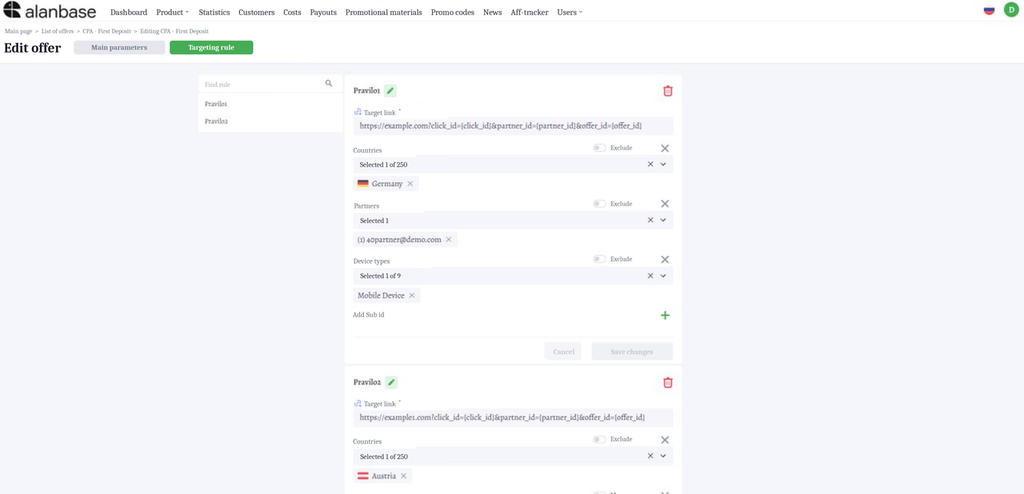
Five rules, one referral link. The affiliate changes nothing on their side and does not even need to know their traffic is being routed. Statistics are written to the offer the user landed in, and postbacks are not lost, because the redirect never leaves the platform.
All of this used to run through Keitaro or a homemade script. It works, but it adds an external redirect, extra hosting, a separate invoice and the risk of losing a postback where the two systems meet. Inside Alanbase that seam is gone.
What TDS does not do: there is no percentage split between flows. If you need a 50/50 rotation between two landings, a targeting rule will not give you that today. A/B tests are built through sub IDs instead – you tag traffic on the source side and split it with a rule.
Numbers from our client statistics: CR on Tier-1 up 38% after separating GEOs, ROI on mobile campaigns up 52% after splitting mobile and desktop, and average program conversion in a CPA network up 31% after affiliate segmentation. Across all TDS cases the range is 30 to 64%. The spread is wide because the effect depends on how badly the traffic was routed before.
Smart Link: one link above all offers
This is a separate section of the platform, not a tab inside an offer. An administrator creates a smart link: name and description with localisations, a tracking domain from the ones already added to the system, and access that is either public or private for a specific group of affiliates.
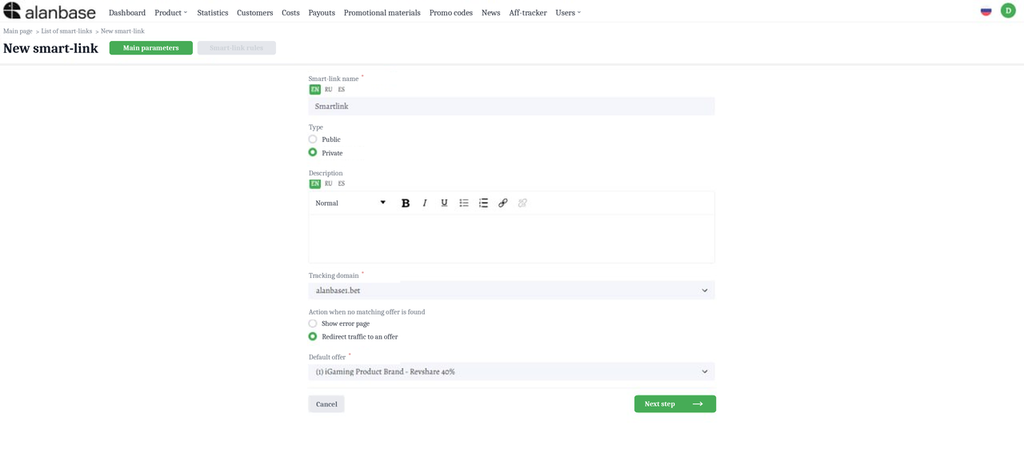
Then come the routing rules, where a country is tied to an offer.
- Germany → Offer DE
- Spain → Offer ES
- Portugal → Offer PT
- Brazil → Offer BR
- India → Offer IN
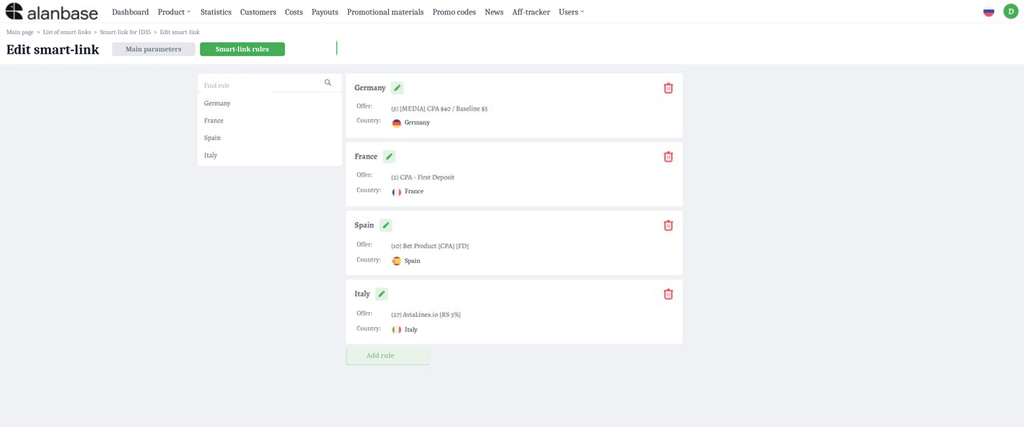
The affiliate opens their portal and takes one tracking link. Not five, one. On click the system detects the country, checks whether this affiliate has access to the matching offer, and sends the user there. The click and every event after it are written to the offer the lead landed in, so your offer-level reporting does not change.
Now back to the manager with a hundred affiliates. Spain moves to a new offer, Portugal is switched off, Mexico is added. All of it happens in the smart link rules. The affiliates’ link stays the same. Not a single message.
Two details worth knowing before you set it up.
If there is no matching offer for the user’s country, or the affiliate has no access to it, the click goes to an exit offer or to an error page. Which of the two is active is your choice. An exit offer is your general international offer, or any other one you do not mind sending non-targeted traffic to.
You can put several offers under one GEO, but there is no rotation or weighting between them yet: the first matching offer wins. If you need to split German traffic between two offers by weight, Smart Link will not do that today.
Only the affiliate generates the link, in their own portal. An administrator cannot generate it on their behalf. That way the affiliate always holds a current link and the manager has nothing to distribute by hand.
Where the two meet
The main thing to understand: these features work on top of each other, not instead of each other.
A click on a smart link first lands in an offer chosen by country. Then, inside that offer, a targeting rule fires. On our setup a mobile user from Brazil sent by a top affiliate goes through like this: Smart Link detects the country and routes them to Offer BR, then TDS inside Offer BR sees Mobile plus the “top” tag and sends them to the PWA landing with the higher bonus.
The affiliate holds one link through all of it. You manage both the list of offers per GEO and the landing pages inside each offer without touching a single affiliate.
That gives a clean split of responsibility. Smart Link is the “which offer” layer. TDS is the “which landing inside the offer, and for whom” layer. Country exists on both layers, and that is the only place where they overlap. If you run one offer across all GEOs with different landings per country, TDS alone is enough. If your offers differ by country, Smart Link picks the offer and the GEO condition in TDS becomes redundant.
Which one you need
Instead of a pros and cons list, four situations.
TDS only. Few offers, a moderate number of affiliates, a stable link scheme. The job is to squeeze more out of the traffic you already have: split mobile and desktop, give top affiliates their own landing, cut off junk traffic, test funnels through sub IDs. That is a conversion job, and TDS covers it end to end.
Smart Link only. Many GEOs, a dedicated offer for each, dozens or hundreds of affiliates, and a scheme that changes weekly. Inside the offers there is a single landing and nothing to split by device. The pain here is operational: manager hours spent redistributing links, and traffic running to switched-off offers while affiliates update.
Both. Multi-GEO plus many affiliates of varying quality plus different funnels per device. In our experience that is most iGaming operators and CPA networks above 50 affiliates. Smart Link removes the operations, TDS delivers the conversion, and the affiliate still holds one link.
Neither. Two GEOs, five affiliates, one landing. Handing out five links manually is faster than configuring rules. Do not overbuild.
Here it is in one table to come back to:
| TDS (targeting rule) | Smart Link | |
|---|---|---|
| Where it is configured | Inside an offer | Separate section |
| What it selects | Landing / flow | Offer |
| Conditions | Country, device and OS, affiliate, sub1-10 | Country |
| Several targets per condition | Through separate rules | First match wins, no weights |
| Who touches the affiliate’s link | Nobody | Nobody, the affiliate takes it themselves |
| Where stats are written | To the offer the user landed in | To the offer the lead went to |
| What it solves | Conversion | Affiliate operations |
Cases by segment
iGaming operator with 15 GEOs. Before Smart Link, every new GEO launch meant an email to every affiliate. After it, a new GEO goes into the rules and traffic reaches it from the next click. Inside the offers, TDS routes mobile to PWA and desktop to a landing with a pre-lander. For the manager it means a new GEO takes a couple of minutes, and affiliates do not have to be notified at all.
CPA network with a hundred affiliates. A private smart link: top affiliates get access to all GEOs, new partners only to part of the offers. Inside the offers, an affiliate-based rule gives top performers a bonus landing and newcomers a test one. Per our statistics, average program conversion went up 31%, because the top affiliates got better terms and increased volume.
Media buying team. Here TDS matters more. The buyer tags traffic with sub IDs on the source side, and rules inside the offer route expensive traffic to a premium funnel and cheap traffic to the highest-converting one. One client reached +64% ROI on their Facebook campaigns within a week of setting up sub-based routing. A team needs Smart Link only if it runs many GEOs and hands links to sub-buyers.
What to check on your side before setting up
Three questions that save a week of rework.
How many times in the past month did you ask affiliates to update their link? More than once means you need Smart Link. Zero means you do not.
Do you know CR separately for mobile and desktop in each offer? If not, you do not know what you are losing, and TDS is worth setting up for that number alone.
Is there a place in your scheme where you need weights between offers within one GEO? If yes, Smart Link will not cover it today, and it is better to know that before the setup than after.
Want to see this on your own scheme? Book a demo call: we will go through your GEOs and offers, build the rules around your affiliate structure, and give you 14 days of access with no card required.